BEAR - WooCommerce Bulk Editor and Products Manager Professional
How to detach completely an attribute from the product?
For example you decided detach completely attribute Material from the variable products. Do next steps:
Using the functionality of the tab 'Filters' make filtering of the products by type: 'Variable' and also if necessary you can filter by more parameters
If you need to change only some products you can select them using checkboxes in the Products Editor or skip this step. Also you should know that you can do this operation without any filtering using product selection by checkboxes only.
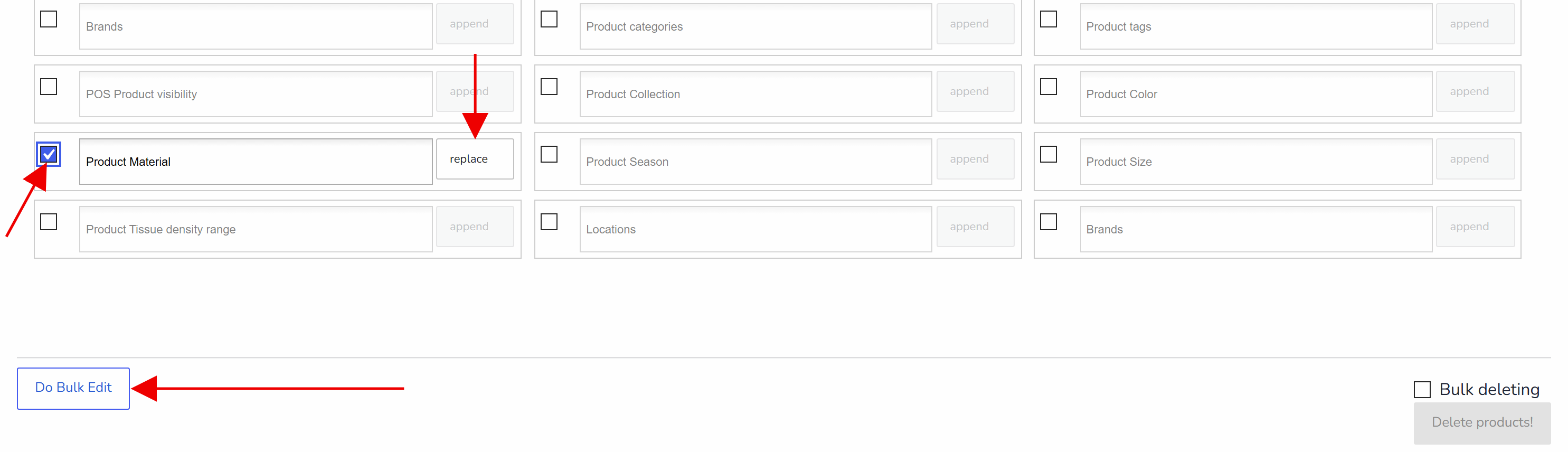
Go to tab 'Bulk Edit' and enable there in section taxonomies attribute 'Product Material'
Do not select any terms in the drop-down for the 'materials' there but select behavior in the near drop-down: 'replace'
Click on 'Do Bulk Edit' and wait until operation is finished
If you want you can rollback changes in the tab History
🌸
Documentation for BEAR - WooCommerce Bulk Editor and Products Manager Professional: tabs, tools and developer guides
Documentation — BEAR Bulk Editor
We use cookies to ensure that we give you the best experience on our website. If you continue to use this site we will assume that you are happy with it.