BEAR - WooCommerce Bulk Editor and Products Manager Professional
Can I do a WooCommerce bulk price increase like ‘price x 2’ instead of by percentage?
Yes, a WooCommerce bulk price increase works through percentages anyway. Doubling a price is the same as increasing it by 100%, so:
Filter or tick the products the increase applies to, then open the Bulk Edit tab and check that the line at the top names the products it will touch.
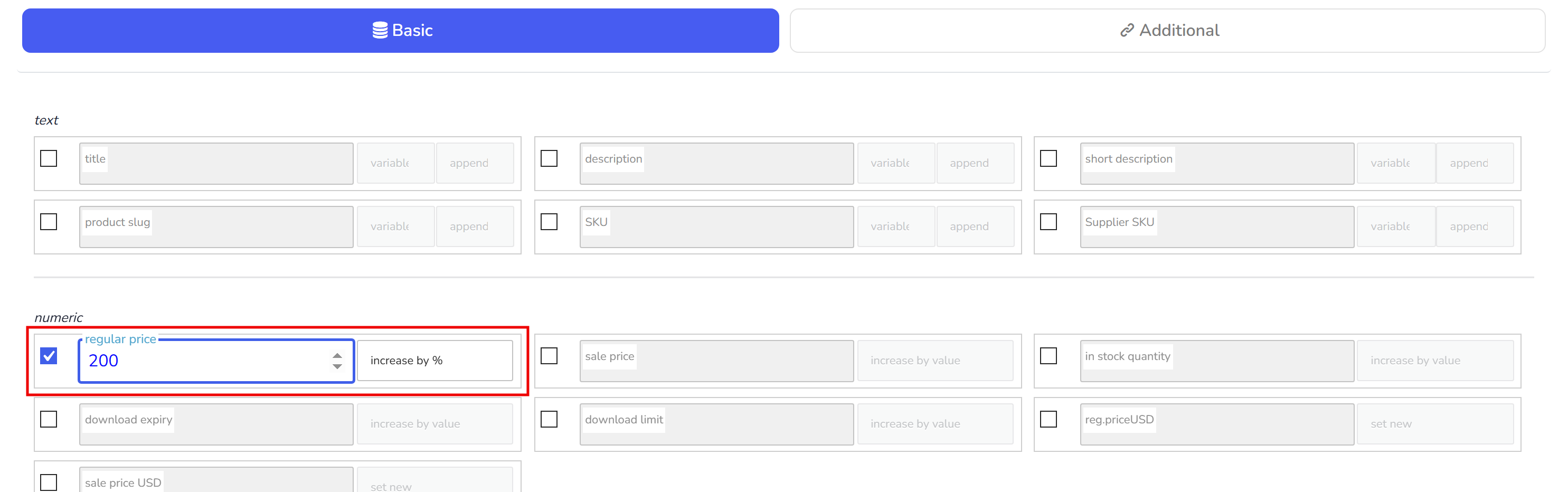
Tick the regular price row, enter 100, and set the behaviour to increase by %.
Run the operation.
The formula is existing value plus existing value × percent / 100: 100 doubles a price, 200 triples it, 50 adds half. The screenshot below shows the same row with 200 entered, which multiplies by three, not by two.
The sale price row has the same behaviours, and regular price minus % on it sets the sale price from the regular one instead. If the result needs rounding to whole numbers or .99 endings, choose it in the rounding drop-down under the numeric group before you run. A mistake can be reverted in History; undo it with Revert, not with the opposite percentage, because the second percentage is calculated from the new price.
🌸
Documentation for BEAR - WooCommerce Bulk Editor and Products Manager Professional: tabs, tools and developer guides
Documentation — BEAR Bulk Editor
We use cookies to ensure that we give you the best experience on our website. If you continue to use this site we will assume that you are happy with it.